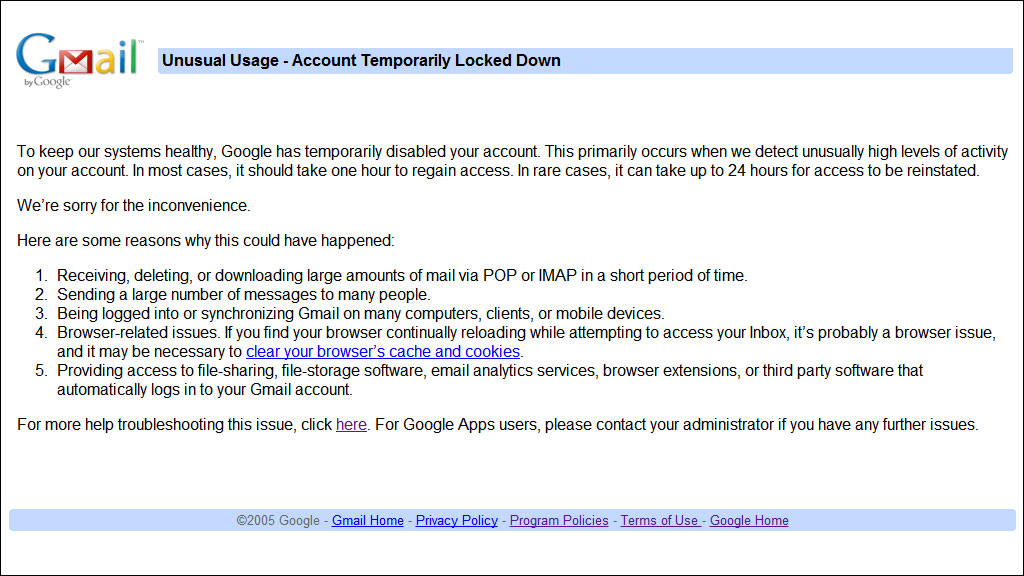
 So there’s your tip of the day. I think the cut-off might be 300 MB, because I was able to successfully upload 292 MB before it decided it was time for me to stop.If you’re wondering, no, I do not produce hundreds of megabytes of backups per day. This was stuff from the past handful of months or so, and it was a combination of mostly PDF/document packages and interval content backups for my website.And finally, I’m going to assume that most of you are going to wonder what I mean by “packages,” so I’ll explain it now before people ask. If you were not already aware, the largest size for an individual file you can upload to Gmail is 25,000 KB. This means that I can’t combine all the files I want to upload into a single massive archive, but this also means that I don’t have to upload every single file individually. I take files that share something in common (for example, backups for Parkzer.com taken during September 2011) and combine them into a one archive so it’s not too big that it can’t be uploaded but not too small that it’s annoying to upload.So yeah, I’m hoping my account isn’t going to be one of those rare cases that take 24 hours to be restored. I guess I’ll find out tomorrow morning when I wake up, and meanwhile, I’m going to sleep.
 Account Temporarily Locked Down
This post is over 15 years old and may contain information that is incorrect, outdated, or no longer relevant.
My views and opinions can change, and those that are expressed in this post may not necessarily reflect the ones I hold today.
I learned today that if you’re going to store a lot of files onto your Gmail account because you haven’t been keeping up with your online backups, you shouldn’t upload more than a couple hundred megabytes, or else this will happen:So there’s your tip of the day. I think the cut-off might be 300 MB, because I was able to successfully upload 292 MB before it decided it was time for me to stop.If you’re wondering, no, I do not produce hundreds of megabytes of backups per day. This was stuff from the past handful of months or so, and it was a combination of mostly PDF/document packages and interval content backups for my website.And finally, I’m going to assume that most of you are going to wonder what I mean by “packages,” so I’ll explain it now before people ask. If you were not already aware, the largest size for an individual file you can upload to Gmail is 25,000 KB. This means that I can’t combine all the files I want to upload into a single massive archive, but this also means that I don’t have to upload every single file individually. I take files that share something in common (for example, backups for Parkzer.com taken during September 2011) and combine them into a one archive so it’s not too big that it can’t be uploaded but not too small that it’s annoying to upload.So yeah, I’m hoping my account isn’t going to be one of those rare cases that take 24 hours to be restored. I guess I’ll find out tomorrow morning when I wake up, and meanwhile, I’m going to sleep.
So there’s your tip of the day. I think the cut-off might be 300 MB, because I was able to successfully upload 292 MB before it decided it was time for me to stop.If you’re wondering, no, I do not produce hundreds of megabytes of backups per day. This was stuff from the past handful of months or so, and it was a combination of mostly PDF/document packages and interval content backups for my website.And finally, I’m going to assume that most of you are going to wonder what I mean by “packages,” so I’ll explain it now before people ask. If you were not already aware, the largest size for an individual file you can upload to Gmail is 25,000 KB. This means that I can’t combine all the files I want to upload into a single massive archive, but this also means that I don’t have to upload every single file individually. I take files that share something in common (for example, backups for Parkzer.com taken during September 2011) and combine them into a one archive so it’s not too big that it can’t be uploaded but not too small that it’s annoying to upload.So yeah, I’m hoping my account isn’t going to be one of those rare cases that take 24 hours to be restored. I guess I’ll find out tomorrow morning when I wake up, and meanwhile, I’m going to sleep.  That’s what I was studying and memorizing off of right up to about 10 minutes before the exam. (I took the photo with my iPod, which is why the quality fails.)The exam was not pleasant.At least I don’t have any more exams for another 2.5 weeks.
  (Photo taken by
  We then dissected a squid (which was slightly more gory than the mussel and I thought it would be better not to take a picture of it).We also got to look at a tiny little adorable baby squid, which was only visible in detail under a microscope. I tried my best to stick my camera lens into the eyepiece of the microscope and snap a picture of it before it swam away to another edge of the petri dish, and this is what I got.
 I also had my first exam of the semester today, which was surprisingly easy. In fact, it was so easy that it felt like I was forgetting to do a page of the exam or something. One quiz and one exam down, one more exam to go for this week.
  What an excellent idea, let’s just zoom in too much to make the text too large, then go ahead and drill the spiral binding right into the first column of letters!
  First of all, I would like to make it clear that I am not responsible for placing any banner-sized advertisements on my website. The advertisement you see at the top-right corner is controlled by Google Adsense, and they decide what advertisements to put in that spot.That being said, that also means that I do not personally support or endorse any advertisements appearing in that ad zone.The email that was sent to me yesterday asked me if the FLV player being advertised in that banner was a legitimate and reliable flash player. My answer to this is that I don’t know. According to the terms and conditions of Google Adsense, I am never permitted to ever click on any of the advertisements that appear on my website. In addition, even if I were to have permission to click on my own ads, I would not go through each one and test it out to see if it was a good website. Thus, my word of advice for advertisements on my website is to be cautious when visiting other websites. If you think that something is suspicious on a website that shows up after clicking on one of my ads, leave it immediately and don’t download anything from it.Also, make sure you have active and updated anti-virus software installed and running on your computer.As for that specific advertisement, if you really need a player for FLV files, I recommend getting