I’ve always wanted to make a wishlist series and feature items about once or twice a month that I came across during that time period that seem appealing to me. I had the idea of starting this sometime in November of 2011 when I first started adding items to my Amazon wish list. Literally a year later, I finally got the time and motivation to execute my idea.
Please note that these items are elements of my wish list as of today, and not any time in the future. For the latest updates, please check my Amazon wish list directly at
http://amzn.com/w/1EG9DR8JK4295.
—
Razer Blackwidow Ultimate 2013 Elite Mechanical Keyboard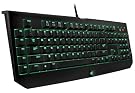
While I was browsing through some mechanical keyboards, I noticed that Razer came out with a newer version of their Blackwidow. I currently have the original Razer Blackwidow, and I think that it’s the best keyboard I’ve ever used.
The Blackwidow has blue switches. I’m nowhere near a keyboard expert, but I do understand that blue switches are food for typing, and I can definitely agree with that from experience.
Those of you who don’t know me well might not realize that I’m an extremely fast typist – my overall average is about 134 words per minute, and I can reach speeds of about 170 words per minute when instant messaging or typing anything limited to basic English.
I haven’t particularly done tests to statistically prove myself right or wrong, but even at this intense level of typing speed, there is still a difference – I can feel myself typing faster on the Razer Blackwidow as opposed to my laptop keyboard or any regular keyboard I might find on a public desktop computer.
I’m looking to get myself another Razer keyboard soon because there’s a new location with a desktop computer where I spend a lot of time, and the new Blackwidow seems to be a good candidate. If I do end up getting this, I would use it as a replacement to my old Razer keyboard, and move my old Razer keyboard to my secondary office.
Razer Deathadder Black 3500 High Precision Infrared Mouse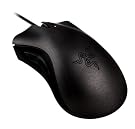
I’ve never really considered the type of mouse I use as a high priority, but when I tried to play League of Legends on a different desktop computer with a poor mouse and no mouse surface (I was using it on a semi-glossy table), I realized how important it is and how significantly it can influence me when I’m doing something that actually involves intensive mouse use, and how much it can affect my accuracy.
Being satisfied with Razer keyboards, I would obviously turn to Razer for a high-quality mouse as well, and I’ve settled upon the Deathadder as my pick.
By looking at the technical specifications of the mouse, it seems like a solid mouse that focuses on the basics, without charging me more money for extra bells and whistles that I know I’m never going to use. After reading the reviews, I discovered that a majority of customers feel as if it’s a strong, stable, durable mouse that’s still comfortable to use – which is exactly what I want.
As of right now, I’m using a pretty cheap mouse with (literally) a sheet of notebook paper as my mouse surface. If I do end up getting this, I will most likely get a proper surface for it as well to ensure that I get the most out of its extreme precision.
—
That’s all that I’m going to cover in detail today, but I have a bunch of other stuff on my
Amazon wish list that I think is worth taking a look at.
Again, even though I don’t expect anyone to get me anything, if you are considering it, please be sure to
check my actual wish list first, as it may have been updated if I already got the item, or switched it out with a different item of better quality but same purpose.
 Seen in the photo is the Razer BlackWidow 2013, Razer DeathAdder mouse, and Razer Goliathus surface.I’ll definitely be testing these out extensively within the near future, and will be posting some reviews up on my website.And of course, a thank you to Razer for providing me with the equipment.
 How do you even manage to scratch and gunk up a desk so badly in a single week?-__-
 Ran out of places to hang up decorations? No problem. Just put it on the telescope.
 As you can see from the bottom left, I tried removing the note from my door. Then I realized that the note was so securely attached to my door that the paper would rip before I managed to get any portion of tape off. Apparently, this messenger had the time and motivation to remove four pieces of tape and place them neatly on each corner, covering up the edge so the note would survive a tornado that might spontaneously form in front of my door.So, instead of wasting my time sitting at my door picking off tape, I decided to leave them a note on their note (noteception).In case you can’t read it from the photo above: “All four corners. Serious? Please remove and take after showing.”